MPVI4 Face Plate Description
Below outlines the legacy features on the face plate of the MPVI4, with a detailed description of each LED RGB (red, green, and blue) and bluetooth status icon.
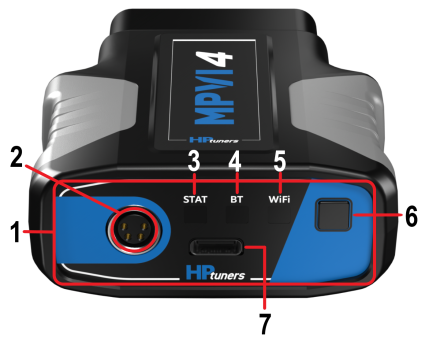
| 1. | MPVI4 Face Plate |
| 2. | HPTNET Screw on Connector |
| 3. | Status LED Icon |
| 4. | Bluetooth Low Energy (BLE) LED |
| 5. | WiFi LED |
| 6. | Standalone Data Log & Bluetooth Button |
| 7. | USB-C |
CAUTION: When over-voltage is detected , the MPVI4 Status LED will become solid red and will remain solid red until voltage drops below 15.5v, then it will go back to solid green. Operating the MPVI4 with voltage over 15.5v can cause damage to the MPVI4.
NOTE: When an overcurrent event is detected, the firmware attempts recovery by cycling the bus OFF and ON up to three times, checking if the current drops below the threshold. If any attempt succeeds, normal operation resumes. However, if all three attempts fail and the current remains high, the LED turns solid red. At that point, only a power cycle or OBD reset will allow the MPVI4 to recover.
MPVI4 RGB Status LED Description Table
|
Color |
Description |
|---|---|
|
No Color |
Off/No App Running |
|
Solid Blue |
MPVI4 is powering on |
|
Medium Blue |
MPVI4 Safe Mode Initiating |
|
Blinking Blue |
MPVI4 Safe Mode Running |
|
Fast Blinking Blue |
MPVI4 Safe Mode USB Active |
|
White |
MPVI4 Safe Mode Ended Successfully |
|
Solid Red |
MPVI4 Safe Mode Exit Failed |
|
Blinking Medium Blue & Medium Yellow |
MPVI4 Safe Mode Firmware Update |
|
Medium Yellow |
MPVI4 Safe Mode Firmware Update Successful |
|
Blinking Medium Blue & Medium Red |
MPVI4 Safe Mode Firmware Update Failed |
|
Medium Blue |
MPVI4 Main Application Starting |
|
Medium Green |
MPVI4 Main Application Running |
|
Fast Blinking Green |
MPVI4 USB Main Application Activity |
|
White |
MPVI4 Main Application Exit Successful |
|
Solid Red |
MPVI4 Main Application Exit Failed |
|
Fast Blinking Medium Green |
Main Application USB Communication |
|
Fast Blinking Medium Green & Medium Magenta |
Main Application USB+OBD Communication |
|
Fast Blinking Medium Yellow |
Main Application Task Starting |
|
Blinking Yellow |
Main Application Task Running |
|
Flashes Red, Yellow and Red, Yellow again then will remain Green |
Main Application Task Returned False |
|
Flashes Red, Yellow and Red, Yellow again then will remain Green |
Main Application Task Exception |
|
Blinking Medium Green & Medium Yellow |
Main Application Firmware Update |
|
Medium Yellow |
Main Application firmware Update Successful |
|
Blinking Medium Green & Medium Red |
Main Application Firmware Update Failed |
MPVI4 RGB bt (bluetooth) LED description table
|
Color |
Description |
|---|---|
|
Blinking Blue |
When blinking slowly the MPVI4 is in pairing mode. When blinking quickly the MPVI4 is paired with the users bluetooth device. |
|
White |
Bluetooth has unpaired successfully |
|
Solid Red |
Bluetooth Failure Detected |
|
Cyan Blue |
MPVI4 Bluetooth Device Connected |
MPVI4 standalone data logging & Bluetooth button
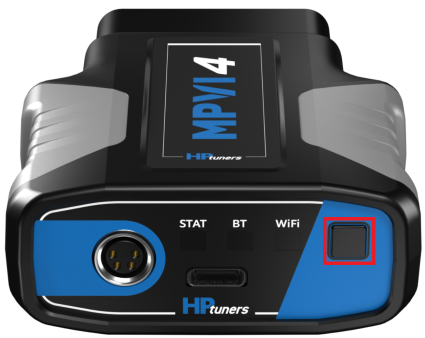
This button (refer to below image) can be used to connect your bluetooth device to your MPVI4. This button can also be used to start and stop your standalone data logging. Below outlines the RGB LED light and their corresponding description associated with the standalone feature.
|
Color |
Description |
|---|---|
|
Blinking Blue |
When the STAT light is blinking fast blue the standalone action has started. When it is blinking blue slowly the standalone action is in progress |
|
Blinking Purple |
MPVI4 Standalone Failed to Start |